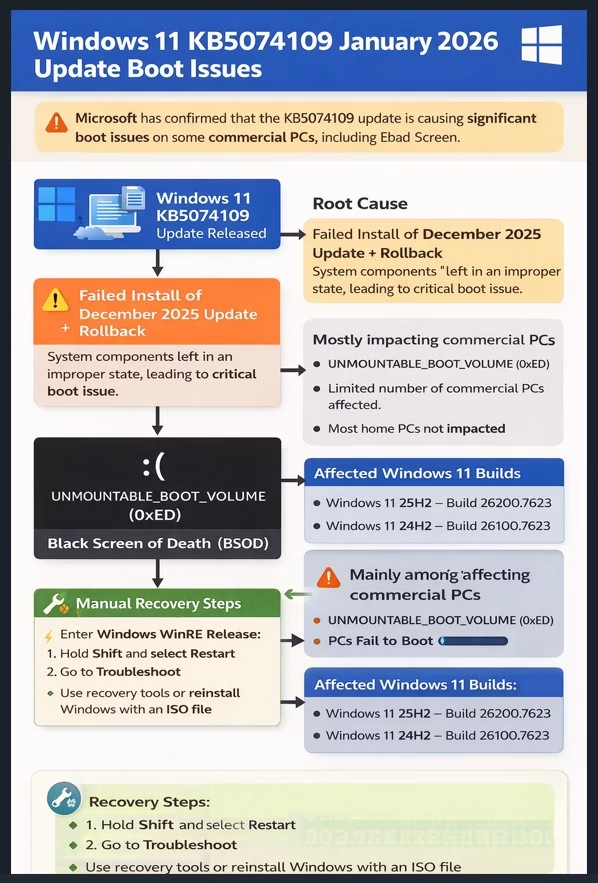
Microsoft has confirmed that the Windows 11 KB5074109 January 2026 update is causing significant boot issues, including the Black Screen of Death (BSOD), on a limited number of commercial (non-consumer) PCs. This problem does not seem to impact the majority of home users, and Microsoft has already taken steps to ensure it does not affect consumer devices.
In an updated support document, Microsoft acknowledged the issue, identified its root cause, and provided information on what affected users can do to recover their systems.
Overview of the Issue
On January 23, Microsoft first reported that it was investigating issues where certain systems were failing to boot after installing the Windows 11 KB5074109 update. Initially, the company was unsure whether this issue was linked to the update itself.
After further investigation, Microsoft confirmed:
- A limited number of PCs are affected by this issue.
- The problem is primarily impacting commercial devices.
- A Black Screen of Death (BSOD) appears, often accompanied by the UNMOUNTABLE_BOOT_VOLUME error (0xED).
- Most consumer PCs are not impacted by this bug.
Affected Windows 11 Builds
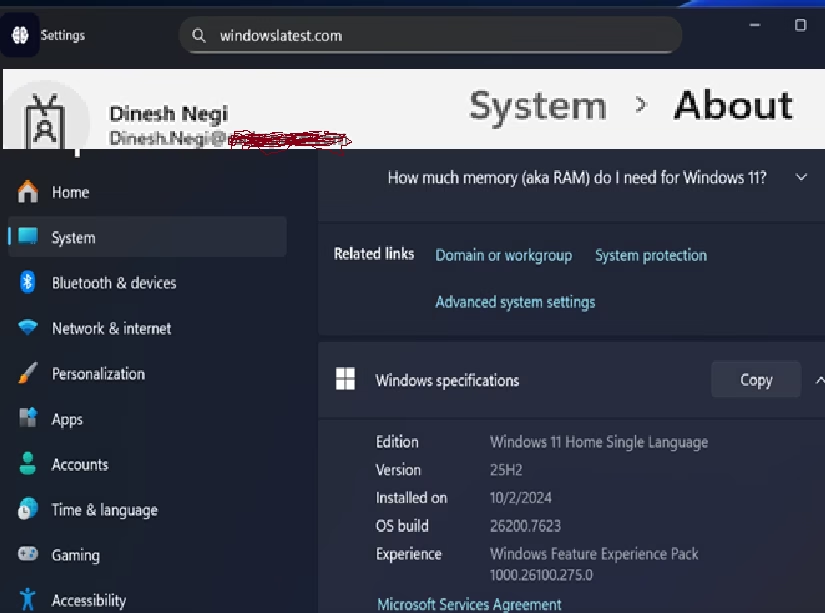
The issue specifically affects the following Windows 11 builds:
- Windows 11 25H2 – Build 26200.7623
- Windows 11 24H2 – Build 26100.7623
You can verify your installed build by going to Settings > System > About.
What is the Black Screen of Death?
The error presented on affected PCs is the Black Screen of Death (BSOD), which has replaced the traditional Blue Screen of Death in Windows 11. This change aligns with the operating system’s updated visual design.
Symptoms include:
- Black screen on boot-up
- Error code UNMOUNTABLE_BOOT_VOLUME (0xED)
- The system becomes unbootable and requires manual recovery.
Microsoft clarified that users will not see the classic blue screen or the frowning face icon. Instead, the screen will be black with the error message.
Manual Recovery Process
If your PC is affected by the Black Screen of Death, you will need to perform manual recovery steps. Here’s what to do:
- Enter Windows Recovery Environment (WinRE):
- Hold Shift while selecting Restart.
- Select Troubleshoot:
- Choose an option to recover or restore your PC.
- Use recovery tools:
- If recovery options are unavailable, you may need to reinstall Windows using an ISO file.
Root Cause of the Issue
Microsoft has identified the root cause of the issue. According to the company, the problem arises from an improper system state caused by:
- Failed installation of the December 2025 security update.
- Rollback of that update, which left certain system components in an inconsistent or “improper state.”
When Windows 11 KB5074109 attempted to install on these affected PCs, it interacted with low-level system components, pushing the system into an unstable state where Windows could not mount the system volume, resulting in the UNMOUNTABLE_BOOT_VOLUME error.
Microsoft’s Official Statement
Microsoft explained:
“Recent investigations have determined this issue can occur on devices that failed to install the December 2025 security update and were left in an improper state after rolling back the update.”
The company went on to say:
“Attempting to install Windows updates while in this improper state could result in the device being unable to boot.”
Microsoft has already deployed a mitigation to prevent additional devices from encountering this issue. However, this fix does not repair affected systems or prevent devices from entering the improper state in the future.
List of Issues in the January 2026 Windows 11 Update
In addition to the boot issues, the January 2026 Windows 11 update has introduced several other problems. Below is a summary of the known issues:
| Issue Detail | Current Status | Workaround | Affected Windows Version |
|---|---|---|---|
| Outlook Classic freezes | Acknowledged by Microsoft | Fixed in out-of-band update (KB5078127) | All supported versions of Windows |
| Third-party apps become unresponsive | Acknowledged by Microsoft | Fixed in out-of-band update (KB5078127) | All supported versions of Windows |
| Black screen or wallpaper resets | Not officially acknowledged | Restart Windows or reapply wallpaper manually | Windows 11 25H2, 24H2 |
| Sleep mode (S3) stops working on older PCs | Not officially acknowledged | No reliable workaround available | Windows 11 24H2 / 25H2 on systems using S3 |
| Desktop.ini broken in File Explorer | Not officially acknowledged | No workaround; folders still function but UI is incorrect | Windows 11 25H2, 24H2 |
| Citrix Remote Desktop not working | Acknowledged by Citrix | Remove the update or switch to alternatives | Windows 11 25H2, 24H2 and Windows Server 2025, 2022 |
| Remote Desktop stops working | Acknowledged by Microsoft | Fixed in first out-of-band update (KB5077744) | All supported versions of Windows |
| Shutdown feature does not work properly | Acknowledged by Microsoft | Fixed with first out-of-band update (KB5077797) | 23H2 |
| System fails to boot | Acknowledged by Microsoft | Use Windows Recovery or reinstall Windows using an ISO | 25H2 and 24H2 |
What You Should Do
If your PC is affected by any of these issues, here are some steps to consider:
- For boot issues: Follow the manual recovery steps mentioned above.
- For Outlook and third-party app freezes: Install the emergency update KB5078127.
- For sleep mode or Remote Desktop issues: Monitor for future updates from Microsoft or use temporary workarounds.
Conclusion
While the Windows 11 KB5074109 update has introduced significant problems for a small subset of users, Microsoft is actively addressing the issues. The company has already rolled out fixes for some of the problems, including Outlook freezes and Remote Desktop failures, and is working on a more permanent solution for others.
Reference
For more detailed information, visit the original article on WindowsLatest.com.
As always, keeping your system up to date and ensuring that your device is in a stable state before updating can help prevent these types of issues.