When SYSVOL or NetLogon stops replicating between domain controllers, Active Directory becomes unstable very quickly.
Group Policies fail to apply, users cannot authenticate, DNS breaks, and your secondary domain controller may stop functioning as soon as DC1 goes offline.
This issue is extremely common in IT environments, so in this article I am sharing a real-world troubleshooting case along with the exact steps required to fix it.
Scenario Overview
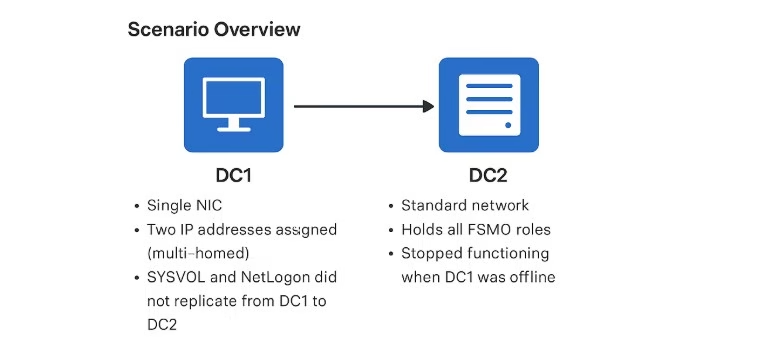
A friend had two Windows Server 2019 domain controllers where SYSVOL and NetLogon were not replicating from DC1 to DC2.
DC1 was configured with one NIC but two IP addresses, all FSMO roles were on DC2, and both servers were reporting DNS problems.
Additionally, DC2 stopped working entirely whenever DC1 was shut down.
So what should be checked and corrected to restore replication and make both domain controllers work independently?
Below are my recommended solutions, including complete details.
If you have faced a similar issue, feel free to share your experience in the comments.
✅ Root Causes
1. DC1 is multi-homed (two IPs on one NIC)
This almost always breaks:
- SYSVOL/Netlogon replication (DFSR)
- DNS registration
- Active Directory replication
Multi-homed DCs create duplicate “ghost” DNS records and inconsistent SRV registrations.
2. SYSVOL is not shared on DC2
This means DC2 is:
- Not a valid logon server
- Missing Group Policy objects and scripts
- Stuck in an incomplete DFSR initial sync state
3. DNS is misconfigured on both DCs
Both DCs must use only internal DNS and must not register secondary IP addresses.
Part 1: Remove the Second IP Address from DC1
Windows does not support multi-homed domain controllers.
This breaks DNS, Netlogon, Kerberos, and DFSR.
Steps
- Open Network Connections
- Edit the NIC → IPv4 Properties
- Remove the secondary IP address
(If needed for another service, assign it on a separate NIC—not the DC’s main NIC)
Flush and re-register DNS
ipconfig /flushdns
ipconfig /registerdns
nltest /dsregdns
net stop netlogon & net start netlogon
Clean incorrect DNS records
On each DC in the DNS zone:
- Delete old or secondary IP A/AAAA records for DC1
- Ensure only one A record exists per domain controller
Part 2: Fix DNS Configuration on Both DCs
Correct internal DNS settings
For DC1:
- Preferred DNS: DC1
- Alternate DNS: DC2
For DC2:
- Preferred DNS: DC2
- Alternate DNS: DC1
Disable DNS registration on secondary NICs
NIC → IPv4 → Advanced → DNS
Uncheck:
- Register this connection’s address in DNS
- Use this connection’s DNS suffix in DNS registration
Part 3: Diagnose SYSVOL/NetLogon Replication (DFSR)
You need to confirm whether SYSVOL is:
- Actively replicating
- Stuck in initial sync
- Or missing final-authoritative state
1. Check if SYSVOL is shared
Run on each DC:
net share
You should see:
SYSVOL
NETLOGON
If they are missing on DC2 → DFSR initial sync never completed.
2. Check DFSR health
Run on both DCs:
dfsrdiag replicationset
dfsrdiag backlog /rgname:"Domain System Volume" /rfname:"SYSVOL Share" /sendingmember:DC1 /receivingmember:DC2
dfsrdiag backlog /rgname:"Domain System Volume" /rfname:"SYSVOL Share" /sendingmember:DC2 /receivingmember:DC1
If backlog shows infinite, or errors → DC2 never initialized properly.
Part 4: Force SYSVOL Authoritative (DC1) & Non-Authoritative (DC2) Restore
If DC1 has correct SYSVOL content, use it as the authoritative source.
On DC1 (Authoritative)
net stop dfsr
Registry path:
HKLM\System\CurrentControlSet\Services\DFSR\Parameters\Backup/Restore\Sysvol
Set:
"BurFlags"=dword:000000D4
Start DFSR:
net start dfsr
On DC2 (Non-Authoritative)
net stop dfsr
Registry:
"BurFlags"=dword:000000D2
Start DFSR:
net start dfsr
DC2 will now download a clean SYSVOL copy from DC1.
Part 5: Verify Domain Controller Health
Run on each DC:
dcdiag /v
dcdiag /fix
repadmin /replsummary
repadmin /syncall /AdeP
You should see:
- No SYSVOL/Netlogon errors
- No DNS registration issues
- No missing SPN or secure channel problems
Part 6: Test DC2 Independence (CRITICAL)
After all fixes, shut down DC1 and verify DC2 works:
nltest /dsgetdc:<domain>
net share
echo %logonserver%
repadmin /showrepl
Check DNS:
- DNS service running
- DNS zone loads correctly
- Clients can resolve records and authenticate
If everything works → DC2 is now fully independent and healthy.
If Problems Still Persist
Run deeper checks:
repadmin /showrepl *
repadmin /showobjmeta dc2 "cn=sysvol subscription,cn=domain system volume,cn=dfsr-globalsettings,cn=system,dc=domain,dc=local"
✔ What Actually Fixes the Issue
- Remove the second IP from DC1 (most important step)
- Correct DNS settings so both DCs only use each other internally
- Delete wrong DNS A records pointing to the secondary IP
- Run DFSR authoritative & non-authoritative restore
- Re-check everything using
dcdiagandrepadmin
These steps will fully repair SYSVOL/NetLogon replication and restore domain controller health.