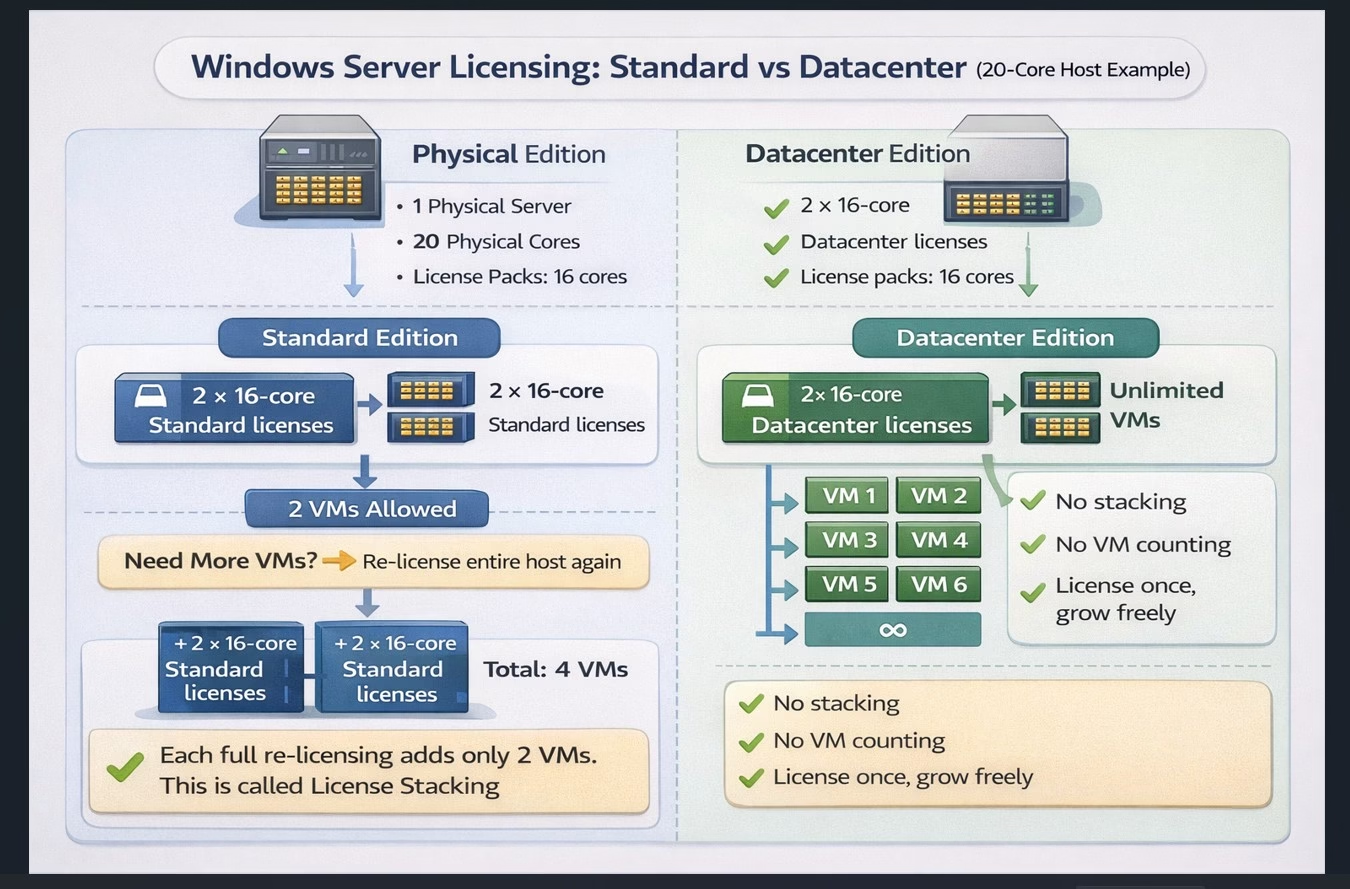
Choosing between Windows Server Standard and Windows Server Datacenter is one of the most common—and potentially costly—decisions in on-premises virtualization. The confusion usually comes from how Microsoft licenses physical cores while granting rights to run virtual machines.
This article explains both editions using a real-world example, compares them side by side, and shows pricing break-even points to help you make an informed decision.
Example Scenario
Assume the following environment:
- 1 physical server
- 20 physical CPU cores
- Hyper-V used for virtualization
- Windows Server 2025
- Workload: Windows Server virtual machines
This represents a typical small-to-mid-size virtualization host.
Step 1: Core Licensing (Applies to Both Editions)
Microsoft licenses Windows Server based on physical cores.
Key rules:
- All physical cores must be licensed
- Minimum of 16 cores per server
- Licenses are sold in 16-core packs
Applying this to our 20-core server
Because licenses come in fixed sizes:
- You must purchase two 16-core licenses
- Total licensed cores: 32
This fully licenses the physical host.
From this point on, the difference between Standard and Datacenter becomes important.
Windows Server Standard Edition Explained
Virtualization rights
Once the server is fully licensed:
- Windows Server Standard allows up to 2 Windows Server virtual machines
At this stage:
- Licensed host: 1×
- VM entitlement: 2 VMs
Adding more VMs with Standard
If the environment grows and you need more virtual machines:
- The entire server must be licensed again
- Another set of licenses covering all 20 cores is required
Each full re-licensing grants:
- +2 additional Windows Server VMs
Example growth:
- 1 full license → 2 VMs
- 2 full licenses → 4 VMs
- 3 full licenses → 6 VMs
This process is known as license stacking.
Windows Server Datacenter Edition Explained
Datacenter uses the same core licensing model:
- All physical cores must be licensed
- Same 16-core minimum and pack sizes
The key difference
Once the server is fully licensed with Datacenter:
- You can run unlimited Windows Server virtual machines
- No license stacking
- No VM counting
In our 20-core example:
- Two 16-core Datacenter licenses fully license the host
- VM count is unlimited
Standard vs Datacenter: Side-by-Side Comparison
| Feature | Standard | Datacenter |
|---|---|---|
| Licensing model | Per physical core | Per physical core |
| Minimum cores per server | 16 | 16 |
| License pack size | 16 cores | 16 cores |
| VM rights per full license | 2 VMs | Unlimited |
| License stacking required | Yes | No |
| Best for | Low VM density | High VM density |
| Audit complexity | Medium–High | Low |
Pricing Break-Even Example
Let’s assume list prices (simplified for illustration):
- 16-core Standard license = $972
- 16-core Datacenter license = $6,155
Prices are approximate MSRP; actual prices vary by reseller, volume licensing, and region.
Standard Edition Costs
- 20-core host → requires two 16-core licenses = 2 × $972 = $1,944
- This allows 2 Windows Server VMs
- To add 2 more VMs → you must license the entire server again = +$1,944
- Total cost for 4 VMs = $3,888
Datacenter Edition Costs
- 20-core host → requires two 16-core licenses = 2 × $6,155 = $12,310
- Allows unlimited Windows Server VMs
Break-Even Analysis
| Scenario | Standard Cost | Datacenter Cost | Notes |
|---|---|---|---|
| 2 VMs | $1,944 | $12,310 | Standard is cheaper |
| 4 VMs | $3,888 | $12,310 | Standard still cheaper, but approaching Datacenter threshold |
| 6 VMs | $5,832 | $12,310 | Datacenter becomes cost-effective for growing workloads |
| 10+ VMs | $9,720+ | $12,310 | Datacenter wins hands down |
Rule of thumb:
- Small VM deployments (≤4 VMs) → Standard is more cost-efficient
- Medium to large deployments (>4 VMs) → Datacenter is generally the better choice
Final Licensing Summary for the Example
| Item | Standard | Datacenter |
|---|---|---|
| Physical cores | 20 | 20 |
| 16-core licenses required | 2 per full license | 2 total |
| Licenses for 4 VMs | 4 × 16-core | 2 × 16-core |
| VM limit | 4 | Unlimited |
| Pricing example | $3,888 | $12,310 |
Key Points.
- Both editions require all physical cores to be licensed
- Standard grants 2 VMs per fully licensed host
- Additional VMs require re-licensing the entire host
- Datacenter allows unlimited Windows Server VMs
- Datacenter is often more cost-effective when VM density grows beyond 4–6 VMs
- Always calculate total licensing cost versus number of VMs before choosing Standard vs Datacenter