A Practical, Compliance-Focused Guide Based on Microsoft Product Terms
Summary
Licensing Microsoft workloads in virtualized environments is one of the most common sources of confusion for organizations—especially when Microsoft SQL Server and Windows Server are installed together in the same virtual machine (VM).
Although both products may run inside a VM, they follow very different licensing models:
- SQL Server licensing is workload-centric and VM-aware
- Windows Server licensing is infrastructure-centric and host-based
Misunderstanding this distinction often leads to audit findings, compliance gaps, and unexpected costs.
This article provides a clear, practical explanation of how to correctly license:
- Microsoft SQL Server running in a VM
- The underlying Windows Server operating system
- Clustered vs. non-clustered environments
- Scenarios with and without Software Assurance (SA)
All guidance aligns with Microsoft Product Terms and is suitable for IT architects, procurement teams, licensing specialists, and Microsoft partners.
Scenario Overview
This article focuses on a common on-premises deployment:
- Workload: Microsoft SQL Server hosted on a Windows Server virtual machine
- Virtualization platform: On-prem hypervisor (VMware, Hyper-V, etc.)
- SQL Server licensing: Core-based licensing
- Windows Server licensing: Perpetual licenses, no Software Assurance
- Architecture: Single host or non-clustered VM
- Customer preference: “License per VM where possible”
SQL Server Licensing in Virtual Machines
Supported Licensing Models
(Microsoft Product Terms – SQL Server, Licensing Models)
SQL Server supports two primary licensing models:
| Licensing Model | Description | CALs Required |
|---|---|---|
| Per Core | License the cores running SQL Server | ❌ No |
| Server + CAL | License the server plus users/devices | ✅ Yes |
For most virtualized enterprise workloads, per-core licensing is the preferred model because it eliminates CAL requirements and supports VM-based deployments.
Per-VM SQL Server Licensing Explained
(Microsoft Product Terms – SQL Server, “Licensing by Individual Virtual Machine”)
SQL Server can be licensed per VM by licensing the virtual cores (vCPUs) assigned to that VM.
Key rules:
- Minimum 4 core licenses per VM
- License only the virtual cores assigned to the VM
- No requirement to license unused physical host cores
- No SQL Server CALs required
Examples:
- VM with 2 vCPUs → still requires 4 SQL core licenses
- VM with 8 vCPUs → requires 8 SQL core licenses
This model is commonly used for:
- Isolated SQL workloads
- Cost-controlled deployments
- Non-clustered or static environments
Software Assurance and SQL Server License Mobility
(Microsoft Product Terms – Universal License Terms, License Mobility)
Software Assurance is not required simply because SQL Server runs in a VM.
However, Software Assurance is required when:
- The VM can migrate between physical hosts (vMotion, Live Migration)
- The VM is part of a cluster
- Licenses need to be reassigned more frequently than every 90 days
Without Software Assurance:
- SQL Server licenses are bound to a specific physical host
- The VM must remain on that host for at least 90 days
In non-clustered environments, SQL Server may be licensed per VM without Software Assurance and remain fully compliant.
Windows Server Licensing: The Critical Difference
Unlike SQL Server, Windows Server is not normally licensed per VM in on-premises environments using perpetual licenses.
Core Licensing Principle
(Microsoft Product Terms – Windows Server, “Licensing the Server”)
Windows Server must be licensed based on:
- All physical cores in the host server
- Minimum 16 cores per server
- Minimum 8 cores per processor
Windows Server licensing:
- Does not depend on VM size
- Does not depend on virtual cores
- Does not license individual workloads
Instead, Windows Server licenses grant rights to run Windows Server instances through Operating System Environment (OSE) rights.
Windows Server Editions and Virtualization Rights
(Microsoft Product Terms – Windows Server, Operating System Environments)
Windows Server Standard
- Licensed per physical core
- Grants rights to run 2 Windows Server VMs
- Additional VMs require stacking licenses
Example:
- 1 Standard license → 2 VMs
- 2 stacked licenses → 4 VMs
- 3 stacked licenses → 6 VMs
Windows Server Datacenter
- Licensed per physical core
- Grants rights to run unlimited Windows Server VMs
- Still limited by the licensed physical host capacity
Datacenter is typically cost-effective in environments with higher VM density or expected growth.
Why Virtual Cores Do Not Matter for Windows Server
(Microsoft Product Terms – Windows Server Definitions)
A frequent misconception is that Windows Server can be licensed based on VM size. This is incorrect.
Windows Server licensing:
- Measures physical hardware capacity
- Ignores virtual CPU allocation
- Remains host-based even when only one VM exists
This misunderstanding is a common cause of Microsoft audit findings.
Per-VM Windows Server Licensing: When Is It Allowed?
True per-VM Windows Server licensing is available only under specific programs.
| Scenario | Per-VM Allowed | Product Terms Basis |
|---|---|---|
| On-prem, perpetual license, no SA | ❌ No | Core-based host licensing |
| On-prem with Software Assurance | ⚠️ Limited | SA grants additional flexibility |
| Subscription licenses | ✅ Yes | Subscription Product Terms |
| SPLA (Service Provider) | ✅ Yes | Service Provider Use Rights |
| Microsoft Azure | ✅ Yes | Windows included in VM pricing |
Volume Licensing alone does not override Windows Server core licensing requirements.
Windows Server Client Access Licenses (CALs)
(Microsoft Product Terms – Windows Server, Client Access Licenses)
Windows Server always requires CALs, regardless of:
- Virtualization
- Core licensing
- Edition (Standard or Datacenter)
- Number of VMs
CALs are required for every user or device accessing Windows Server services and are separate from core licensing.
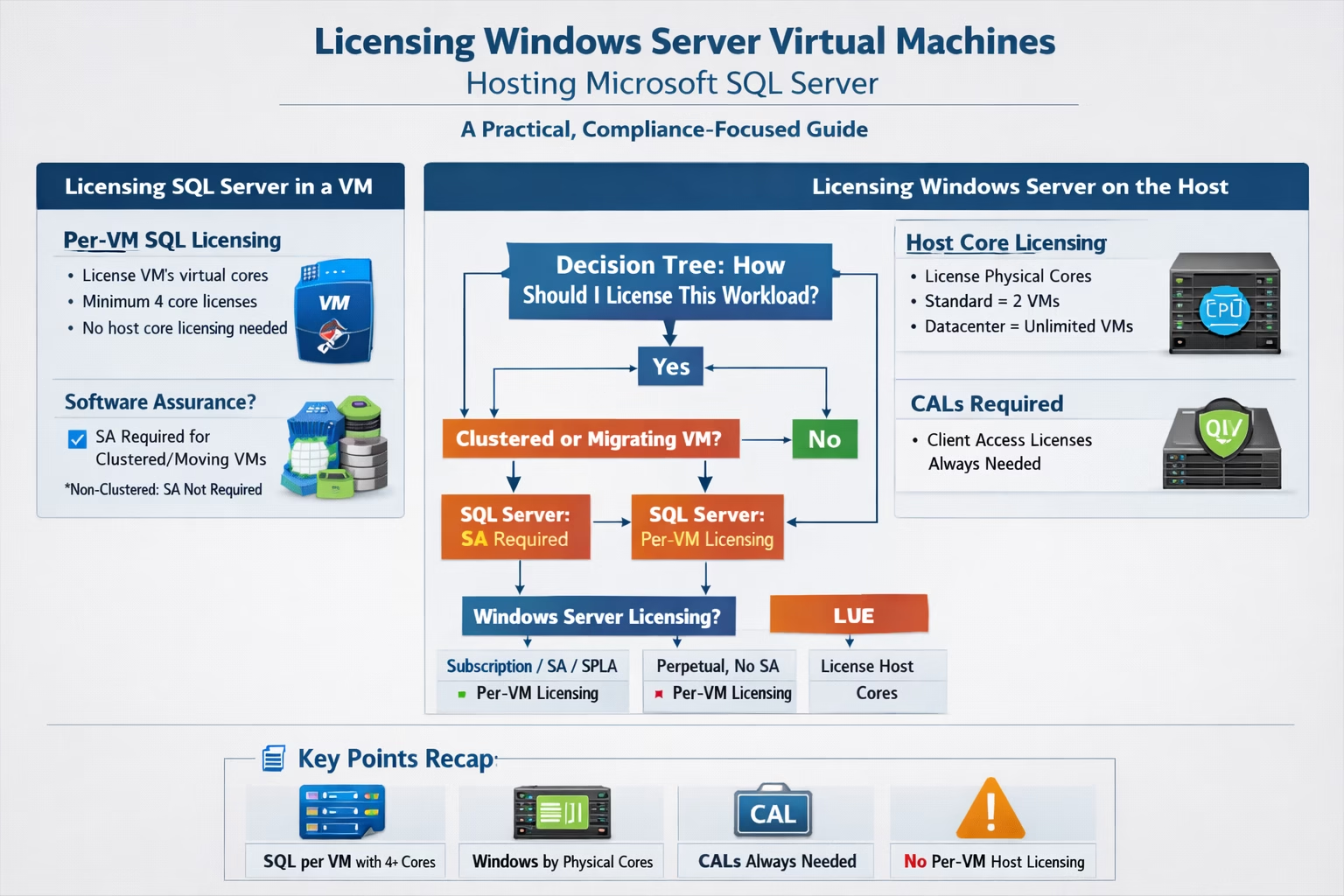
Licensing Decision Logic (Summary)
- Is SQL Server running in a VM?
→ SQL Server Product Terms apply - Is the VM clustered or mobile?
- Yes → SQL Server requires Software Assurance
- No → SQL Server per-VM licensing without SA is allowed
- How is Windows Server licensed?
- Subscription / SPLA / Azure → Per-VM possible
- Perpetual, no SA → License all physical host cores
This logic ensures independent compliance with both SQL Server and Windows Server Product Terms.
Recommended Licensing for the Stated Scenario
For a non-clustered SQL Server VM without Software Assurance:
SQL Server
- License per VM
- License assigned virtual cores
- Minimum 4 cores per VM
Windows Server
- License all physical host cores
- Choose:
- Standard for 1–2 VMs
- Datacenter if VM growth is expected
CALs
- Required for Windows Server access
This approach is:
- Fully compliant
- Cost-efficient
- Audit-defensible
Conclusion
Microsoft Product Terms clearly distinguish:
- SQL Server as a workload-centric, VM-aware product
- Windows Server as a host-centric, capacity-based product
Attempting to license both using a single per-VM approach—without Software Assurance—creates direct compliance risk.
Organizations should evaluate:
- VM mobility requirements
- Expected VM density
- Long-term growth
- CAL exposure
Early architectural clarity results in simpler licensing, cleaner audits, and lower total cost of ownership.
Microsoft Product Terms References
- Microsoft Product Terms
https://www.microsoft.com/licensing/terms - SQL Server – Licensing by Individual Virtual Machine
Product Terms → SQL Server → Licensing Models - License Mobility through Software Assurance
Product Terms → Universal License Terms - Windows Server – Core Licensing & OSE Rights
Product Terms → Windows Server → Licensing the Server - Windows Server – Client Access Licenses (CALs)
Product Terms → Windows Server → Client Access Licenses